| Menu | About
us |
BARCODE.CO.UK Tel: 0870
741 2839 |
 |
BARCODE.CO.UK add-ons and integrated
solutions for; QuickBooks

A solution that works now and in the future
(week in week out, year in year out) - works with any QuickBooks version
you should move to - works even if your business procedures change.
In a nutshell we offer continuity - FREE upgrades + FREE
changes / software enhancements + UNLIMITED support
with extended hours (8AM-8PM, 365 days a year). |
CASE
STUDIES |
Case
studies coming soon.
Our solutions range from £349 per year. We deliver solutions to
QuickBooks users of every size, across the whole of the UK. One reason our prices
are so low is that we never waste time and money visiting people during
any part of the process. We only earn our fee if people come back each
year (which is what we want). Our customers get unlimited FREE technical support via;
phone (normal rate call), web (e.g. downloading free
updates), email (e.g. your requests for changes or ideas), fax
(e.g. if you need to send examples of barcodes you must copy) or by post
(e.g. sending you sample labels).
|
| NEWS |
On the road, in a showroom or warehouse Portable Order now
displays Sales History - when customers ask "How many of
these do I normally order" - just tell them - prevent under
ordering. This is a valuable service
your customers would miss. View a full 12 months of
order history by product. Sales history can be added to our other QuickBooks
products. |
| NEWS |
Job Tracking is for people with services
(or products) that involve one or more production processes.
Answer customer questions like; "Where is my
order up to?" - "Are these items
ready?". Job Tracking produces a Microsoft Excel
workbook that shows you instantly where every line of every order is
up to - in fact, even before the customer has asked the question - you can
have the answer on the screen.
You can often cheer up a customer - with some basic information (even
if it's not what they wanted to hear) - you can avoid
saying; "I'm sorry your job is late. I
don't know where it is, or when it will be ready."
|
| NOTE |
Solutions come with FREE upgrades (e.g. if you upgrade QuickBooks
or
your barcode readers or printers) and FREE changes if you decide
you would like a feature not present, or you simply change your mind (or
business procedures change). All from £349 per year, per module -
think of it as less than £7 per week. |
QuickBooks Add-Ons from BARCODE.CO.UK
remove tedious tasks and prevent
costly errors - helping you get the most out of QuickBooks more...
Our add-ons are all about efficiency, efficiency, efficiency. Time
consuming QuickBooks operations are automated and stressful, error prone, manual paper
based processes are eliminated.
BARCODE.CO.UK QuickBooks Add-On Metrologic Portable Laser Terminal for automatic order input -
Call 0870 741 2839 for free advice
Because of its many uses, this package has several names; "Exhibition Order
Taking" - "Showroom Order
Taking" - "Pick Order First" - "Mobile Phone Order
Picking".
|
|
We call it the BARCODE.CO.UK
Portable Order
Application. Now your staff can automate the input of orders anywhere
they like; whilst stood with a mobile phone pressed in one ear, while looking at
actual products
on the shelf (e.g. "We don't have it in the blue, but I
can let you have 5 in red, OK?". BEEP! and key 5). Even if you wait
until after you have picked the complete order - it's a fast way of getting the
data right in to QuickBooks. Or take orders while showing a customer around a showroom
(e.g. "I'll have 10 of those" - BEEP! and key 10. "And 5 of them" - BEEP! and key 5, etc.)
Q: How does it work?
A: You have goods; in front of you, being pointed at by
a customer, or already on a trolley or in baskets (or in a big heap on the floor).
Click a button and the product code is entered instanly
and accurately then key the quantity (the Metrologic portable laser
reader terminal contains software developed by BARCODE.CO.UK
to allow capture of
barcode data, keyed quantity data, etc.).
To update QuickBooks simply press a button - which runs software
developed by BARCODE.CO.UK to automatically create an order in
QuickBooks.
Then call 0870 741 2365 for free
helpful and FREE support.
This sofware package is very powerful and open - for
example, you do not need to opt for the Metrologic equipment - all that is
required is that a *.CSV (Comma Separated Variable) text file is provided, like
so;
029479002712,10
507347690291,5
etc.
it contains stock codes and quantities. This simple file can
be from any source; your internet web site, from an email order, your own
portable data capture terminal (i.e. like the Metrologic terminal), from a
customer's spreadsheet order, from a form, etc.
|
BARCODE.CO.UK QuickBooks Add-On Intermec C4 Product Labeller - Call 0870
741 2839 for free advice
Need to label products before putting them in to your inventory?
| (1) Select
a Purchase Order |
(2) Select
products. Print labels |
|
Q: How does it work?
A: Enter or select a Purchase Order in QuickBooks (i.e. the
Purchase Order tells our application what items have likely arrived).
| Note: At time of writing QuickBooks is version 11,
but when version 12 is released our software will allow you to select a
GRN (Goods Receipt Note) which are a better source of information about
what has arrived (i.e. a GRN is what has arrived).
Note: Some people get a free label printer from their courier,
which can be used for free (Amtrak, AMT, APC, Business Post, Carryfast, Citylink, DHL,
Fastways, Fedex, Interlink, Lynx, Night Freight, Night Speed, Parcel Force, Parcel Line,
Pegasus, Royal Mail, Reality Group, Securicor Omega, S.P.D.S, Target, TNT, Tuffnells, UK Express, UPS, ...)
|
|
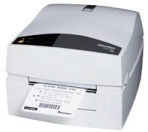
We supply solutions for users of printers from; Eltron,
Zebra, Intermec, Godex, TEC, Sato, Citizen, Cognitive, Datamax, Monarch,
Avery Dennison, Argox, Autronics, Birch, Brady, Bradyprinter, Cab,
Century, Comtec, Datasouth, Don Print, Fastmark, Paxar, Etisys, Epson,
Panex, Astech, C.Itoh, Ithica, Imaje, IBM, Pitney Bowes, Printronix,
Panex, Meto, Novexx, Okabe, QuickLabel, Ring, Valentin, VIPColor, System
Wave, Samsung, Tharo, Thermopatch, ThermoTex, TSC, Taiwanese
Semiconductor, Automated Packaging Systems, ThermoTex, Tyco, Unimark,
Wedderburn, etc.
For example, for volume label printing we recommend two
Intermec PC4 / C4 thermal label printers, or two Zebra Z4M Plus
thermal label printers.

|
Click a button and labels are printed - one or more for every product;
depending on the quantity ordered.
This applications is integrated
in to QuickBooks so you can start it with one click.
Options for printing or not printing Product Code
or Supplier's Part Number, QuickBooks Price or price from an
external file (based on Customer; usually for resellers), QuickBooks Description
or description from an external file. If a product always arrives with a
barcode already printed on it, just flag it in our software and no labels will ever be printed for that
product (i.e. our software remembers and automatically de-selects
this product for label printing - saving you valuable time - obviously you
can override this any time you want).
Q: Will this do what I want?
A: Yes - we guarantee it. We can guarantee it
because we first talk with you about what you need - if our standard
software does not do exactly what you need we modify it - we send you a
trial version - so you can see exactly how it works - even after you have
paid for it, you can ask us to make a change (for example, if
using it for real shows up something you did not anticipate, or if you
made a mistake in what you asked for). Which all means you can't go
wrong.
NEW! Now we offer a module to label
parts when shipped out. Example: If you make or
distribute a Widget that fits many different machines (i.e. it's a
common part), your customers needs to know it is a Dyson P-276 Widget,
or a Hoover 01762-B Widget. You want to stock your Widget as your
part number 72 (i.e. so your stock management is
simplified). Our solution prints the correct label, from your Sales Order
or Invoice description, so now your customers can identify the band's
part number; which simplifies their stock management.
|
Note: Versions available for QuickBooks versions 8, 9, 10, 11, 12, ... (Call if you
don't see the one you need).
|
|
Note: If you tried this or any of our
downloads before - just download the
small update file (<500k).
|
|
Also - download the demolabels file
- as it contains some sample label designs.
|
|
Help - even while you are trying
this for free - is free and helpful - 0870
741 2365
|
Don't forget - if any part of the demo software
is not to your liking - or you want it to work differently - we tailor it
for free
- and that includes any time in the future.
|
Please call 0870 741 2365 for
helpful FREE advice and FREE
trial version.
BARCODE.CO.UK QuickBooks Add-On Metrologic Portable Laser Terminal Order Picking - Call 0870
741 2839 for free advice
Metrologic portable laser terminal - fully loaded with BARCODE.CO.UK
Stock
Picking Application. Now your staff can make better use of their skates. Pick as
many orders as you want. Skip items not in stock and they will be referenced as
on back order (if you opt for that option).
Options include if something is not in stock you can display an alternative -
this can be tailored for you.
Q: How does it work?
A: Create an order any way you like (options are
available to allow picking without first entering an order).
 Click a button and the list of items on the order
along with the
required quantities are automatically uploaded to the Metrologic portable laser
reader terminal (the Metrologic
portable laser reader terminal also contains software developed by BARCODE.CO.UK
to allow capture of barcode data, keyed quantity data, etc.).
Click a button and the list of items on the order
along with the
required quantities are automatically uploaded to the Metrologic portable laser
reader terminal (the Metrologic
portable laser reader terminal also contains software developed by BARCODE.CO.UK
to allow capture of barcode data, keyed quantity data, etc.).
The terminal displays the item to pick and the item's
location. Pick the item and scan the bar code - BEEP! Wrong item or, if
the item is correct Now enter quantity picked appears (defaulted to the
quantity required, so you can just press ENTER if you have enough on your
shelves). If you are short an item, key in the picked quantity and move on. Pick
as many orders as you like, as fast as you like.
To update QuickBooks simply press a button - which runs software developed by
BARCODE.CO.UK to allow import of the data in to QuickBooks.
Any items that are short, can be handled in a number of ways -
usually the original order is amended with the items actually picked and another
back order is created. Stock adjustment can be a part of this process.
This applications is integrated
in to QuickBooks so you can start it with one click.
Options are available to suit your working practices.
Note: If you like the basic concept behind this
product, but you would like it tailored, to work a bit differently, please call
and we can offer a special version that copes with the way you run your
business; this is one of the beauties of all of our QuickBooks Add-Ons.
Please call 0870 741 2365 for
helpful FREE advice and FREE
trial version.
BARCODE.CO.UK QuickBooks Add-On PSC Falcon 4420/4410 mobile wireless; order picking, stock
movements, ... - Call 0870 741 2839 for free advice
 |
Wireless, live stock picking, live stock information, up to the
minute stock movement tracking.
This applications is integrated
in to QuickBooks so you can start it with one click.
Note: If you like the basic concept behind this product, but you would
like it tailored, to work a bit differently, please call and we can offer a
special version that copes with the way you run your business; this is one of
the beauties of all of our QuickBooks Add-Ons.
Please call 0870 741 2365 for
helpful FREE advice and FREE
trial version. |
BARCODE.CO.UK QuickBooks Add-On Barcode Report - Call 0870 741 2839
for free advice
|
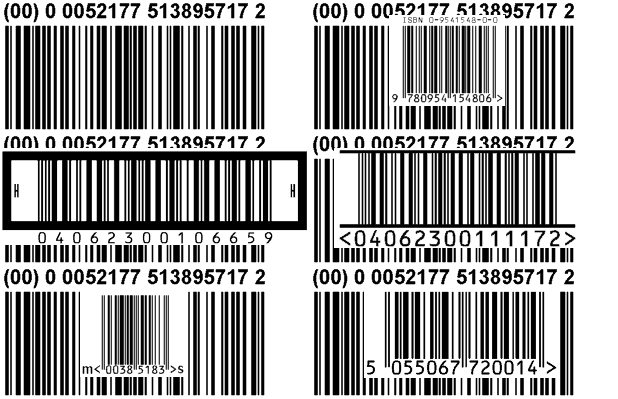
If your customer is large they often 'demand' a barcode on the delivery note
(which they do need; otherwise their business would be completely unmanageable).
Q: How does it work?
Simply click a button to add an automatic barcode to delivery notes.
Note: For customers that need a barcode, you will print a different
delivery note report in QuickBooks. This report is simply a copy of the QuickBooks
standard
report with an added NOTES_3 field used to print the barcode. The barcode
is automatically created.
One of the great advantage of our solution is - you can design everything in QuickBooks
- no need to learn anything new. You can copy QuickBooks's existing reports
and there is no need to change anything in future versions of QuickBooks.
Note: If you like the basic concept behind this product, but you would
like it tailored, to work a bit differently, please call and we can offer a
special version that copes with the way you run your business; this is one of
the beauties of all of our QuickBooks Add-Ons.
|
This applications is integrated
in to QuickBooks so you can start it with one click.
Please call 0870 741 2365 for
helpful FREE advice and FREE
trial version.
BARCODE.CO.UK QuickBooks Add-On Epson TMT88III Receipt Printer - Call 0870
741 2839 for free advice
 |
Print small customer receipts instantaneously from QuickBooks. Ideal for trade counter
sales. Why make customers wait for a massive A4 receipt / invoice.
Also saves you valuable seconds and money. Economically and ecologically friendly.
Q: How does it work?
A: First key, scan, or automatically process a sale - any way you like.
Now simply click a button for a receipt - which pops up already cut to the
right length in less than a second.
There is an option to print bar codes on receipts - for reclaim vouchers,
etc.
|
TIP: If the receipt printer is on a network, in a back store or
warehouse, the receipt can even be used as an order picking list that
is much easier to handle than a bunch of A4 sheets.
This applications is integrated
in to QuickBooks so you can start it with one click.
Note: If you like the basic concept behind this
product, but you would like it tailored, to work a bit differently, please call
and we can offer a special version that copes with the way you run your
business; this is one of the beauties of all of our QuickBooks Add-Ons.
Please call 0870 741 2365 for
helpful FREE advice and FREE
trial version.
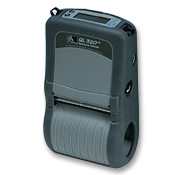
BARCODE.CO.UK QuickBooks Add-On Zebra QL320 Portable Label Printer - Call 0870
741 2839 for free advice
 |
Need to mark items that have been stock taken, or to label specific items for
any reason; reserved, recalled, handle with care, etc.
Q: How does it work?
A: Information about the item(s) that need to be labelled is extracted
from QuickBooks automatically (by software developed by BARCODE.CO.UK). The
QuickBooks data
is uploaded to the Metrologic portable laser reader terminal (the Metrologic
portable laser reader terminal contains software developed by BARCODE.CO.UK
to allow capture of barcode data, keyed quantity data, etc.).
In addition, one or more label designs is also uploaded to the terminal. The
label designer used to create the label designs is a unique package from BARCODE.CO.UK
to allow you to design and store all types of label designs for
this and other applications.
|
When an item is scanned, the BARCODE.CO.UK
portable laser reader terminal
prints the necessary label(s) on the portable BARCODE.CO.UK
Zebra QL320 printer.
The quantity of item(s) can then be keyed, or simply by pressing ENTER all items
can be flagged as completed.
Any entered quantities that indicate complete or incomplete labelling can at
any time be downloaded.
This applications is integrated
in to QuickBooks so you can start it with one click.
Note: If you like the basic concept behind this
product, but you would like it tailored, to work a bit differently, please call
and we can offer a special version that copes with the way you run your
business; this is one of the beauties of all of our QuickBooks Add-Ons.
Please call 0870 741 2365 for helpful
FREE advice and FREE
trial version.
BARCODE.CO.UK QuickBooks Add-On Intermec C4 Shipping Labeller EAN-128.COM - Call 0870
741 2839 for free advice
Need to label boxes or parcels for shipment.
Q: How does it work?
A: Enter or select an order. Click a button - one or more labels print.
|
|
If you have manual weighing scales you can enter a weight.
Options include the ability to print a weight warning label HEAVY or
WARNING
OVER 30KG or just 30KG for example - automatically.
Optimised by BARCODE.CO.UK
for the Intermec EasyCoder C4 Thermal Label
Printer.
This applications is integrated
in to QuickBooks so you can start it with one click.
Note: If you like the basic concept behind this
product, but you would like it tailored, to work a bit differently, please call
and we can offer a special version that copes with the way you run your
business; this is one of the beauties of all of our QuickBooks Add-Ons.
|
Please call 0870 741 2365 for
helpful FREE advice and FREE
trial version.
BARCODE.CO.UK QuickBooks Add-On Zebra TLP 2844 Shipping Labeller EAN-128.COM - Call 0870
741 2839 for free advice
Need to label boxes or parcels for shipment.
Q: How does it work?
A: Enter or select an order. Click a button - one or more labels print.
If you have manual weighing scales you can enter a weight.
Options include the ability to print a weight warning label HEAVY or
WARNING
OVER 30KG or just 30KG automatically.
Optimised by BARCODE.CO.UK
for the Zebra TLP 2844 Thermal Label Printer.
This applications is integrated
in to QuickBooks so you can start it with one click.
Note: If you like the basic concept behind this
product, but you would like it tailored, to work a bit differently, please call
and we can offer a special version that copes with the way you run your
business; this is one of the beauties of all of our QuickBooks Add-Ons.
Please call 0870 741 2365 for
helpful FREE advice and FREE
trial version.
BARCODE.CO.UK QuickBooks Add-On Metrologic Portable Laser Terminal Goods Inward - Call 0870
741 2839 for free advice
Metrologic portable laser terminal - fully loaded with BARCODE.CO.UK
Goods Inward Application. Now your staff can automate the Goods In process with
or without bar codes.
Q: How does it work?
A: You have already created Purchase Orders in QuickBooks,
you sent them now the correct goods have arrived (that's the theory).
|
|
Click a button and the list of items on your Purchase Order and the
ordered quantities are automatically uploaded to the Metrologic portable laser
reader terminal (the Metrologic
portable laser reader terminal contains software developed by BARCODE.CO.UK
to allow capture of barcode data, keyed quantity data, etc.).
The terminal displays the item to be checked or you can scroll
to the item that's first off the delivery van, or more likely scan a bar code on
the items box. BEEP! Item not found (great a free gift - not
likely) if the item is not anything you ordered it can be recorded.
Otherwise Now enter quantity delivered appears (defaulted to the
quantity ordered, so you can just press ENTER if enough arrived). If you are short an item, key in the quantity and move on.
Enter as many deliveries as you like, as fast as you like.
|
To update QuickBooks simply press a button - which runs software developed by
BARCODE.CO.UK to allow import of the data in to QuickBooks.
Any items that are short, can be handled in a number of ways -
options are available to suit your working practices.
Note: If you like the basic concept behind this
product, but you would like it tailored, to work a bit differently, please call
and we can offer a special version that copes with the way you run your
business; this is one of the beauties of all of our QuickBooks Add-Ons.
Please call 0870 741 2365 for
helpful FREE advice and FREE
trial version.
BARCODE.CO.UK QuickBooks Add-On Zebra Z4M Pallet Labeller SSCC-18.COM - Call 0870
741 2839 for free advice
The BARCODE.CO.UK Zebra Z4M Pallet Labeller for SSCC-18
(Serial Shipping Container Code) and other EAN-128 labelling.
Q: How does it work?
Select an Invoice (or other transaction that requires a
shipping label) click and out pops one or more industry standard shipping
labels.
BARCODE.CO.UK are somewhat experts in the field of SSCC-18 and
EAN-128 compliance labelling (e.g. SSCC-18.com,
EAN-128.com and Code128.com).
This applications is integrated
in to QuickBooks so you can start it with one click.
Note: If you like the basic concept behind this
product, but you would like it tailored, to work a bit differently, please call
and we can offer a special version that copes with the way you run your
business; this is one of the beauties of all of our QuickBooks Add-Ons.
Please call 0870 741 2365 for
helpful FREE advice and FREE
trial version.
BARCODE.CO.UK QuickBooks Add-On Metrologic Portable Laser Terminal Stock Adjustments - Call 0870
741 2839 for free advice
This is the basis of many tasks; Stock Taking, Goods
Received, Booking In / Out, Returns, Bill of Material
In / Out. For example, one client wanted to to AI (Adjustments
In) for returned items, and if a part needs to be cannibalised from
a complete kit, the kit (as a whole item) can be booked out (Adjustments
Out) and the individual parts left over can be booked in (Adjustments
In).
Metrologic portable laser terminal - fully loaded with
BARCODE.CO.UK Stock Adjustments application (AI,
AO, DI, DO, GI, GO, WO, GR).
Q: How does it work?
A: Select the type of Stock Adjustment from the
menu; (AI) Adjustments In, (AO) Adjustments Out, (DI) Damages In,
(DO)
Damages Out, (GI) Goods In, (GO) Goods Out, (WO) Write Off,
(GR) Goods
Returned.
Scan an item and key a quantity. Repeat as necessary.
Pop the terminal in the download / charging cradle. Click a button and the list of items
is transfered to your PC ready for import in to QuickBooks. No editing of the data is
needed.
Note: This package uses QuickBooks's own native Stock
Transaction import capabilities, so it is ideal for people who do not want a 3rd
Party Addition.
Note: If you like the basic concept behind this
product, but you would like it tailored, to work a bit differently, please call
and we can offer a special version that copes with the way you run your
business; this is one of the beauties of all of our QuickBooks Add-Ons.
Please call 0870 741 2365 for
helpful FREE advice and FREE
trial version.
|

Then call 0870 741 2365 for free
helpful and FREE support.
|
BARCODE.CO.UK QuickBooks Add-On CRM Customer Relationship Management
(like ACT but simpler) -
Call 0870 741 2839 for free advice
The features of this module are open ended, but we have listed some common
requirements;
A simple telephone dialer automates telephone number dialing so you
can call customers directly from QuickBooks with the click of a button. Call
more people with less stress.
Also, keep any amount of database records, spreadsheets or documents for each
customer and access them instantly using Customer Account from QuickBooks.
With the click of a button in QuickBooks, instantly access an external database by
customers and using Customer Account from QuickBooks automatically see this customer's
additional details.
Q: How does it work?
Access database - we (or you) setup a master Access database (keyed on
the Customer Account) and we simply show you the record of the customer
that you are currently viewing in QuickBooks. This is done with the click of a button
in QuickBooks.
This means you can store any amount of custom fields for customers in Access.
Excel spreadsheet - if you typically use spreadsheets to manage a
customers projects / delivery timelines / etc. we simply show you the
spreadsheet of the customer you are currently viewing in QuickBooks. This is done with
the click of a button in QuickBooks.
If a customer has more than one spreadsheet we can display the folder that
lists all the spreadsheets for that QuickBooks customer.
Word document - if you typically use spreadsheets to manage a
customers projects / delivery timelines / etc. we simply show you the
spreadsheet of the customer you are currently viewing in QuickBooks. This is done with
the click of a button in QuickBooks.
Note: This solution is not limited to; Microsoft Access
databases, Microsoft Excel spreadsheets and Word documents (others can be used
too).
BARCODE.CO.UK QuickBooks Add-On Initial City Link SOP despatcher for
CityLink CLAN 2000 or Label G
users - Call 0870 741 2839 for free advice
For
users of City Link software CityLink CLAN 2000 (Label G version
available on request) and QuickBooks. Now your staff can make better use of their
fingers (than typing in names and addresses they've already typed in before).
Now they can use their fingers to package some more shipments (which is what
they'd prefer to do).

Q: How does it work?
A: Create an Invoice or Sales Order any way you like.
Click a button and the names and addresses of the order(s)
waiting to be despatched (or optionally names and addresses from Invoices) are
sent to CLAN 2000.
You then have complete flexibility to choose any City Link service
level, or other options in City Link CLAN 2000 software.
Print your labels as normal on your existing printer.
This applications can be integrated
in to QuickBooks so you can start it with one click.
Options are available to suit your working practices.
|

Automatically create City Link despatch labels with the
correct address from QuickBooks using the same CLAN 2000 software you are familiar
with.
Then call 0870 741 2365 for free
helpful and FREE support.
Clan 2000 is an Initial City Link
product. All trademarks recognised. BARCODE.CO.UK
City Link Despatcher
is a trademark of BARCODE.CO.UK. All rights reserved.
|
BARCODE.CO.UK QuickBooks Add-On Migrate /
Migration / Export / Downsize / Scale -
Call 0870 741 2839 for free advice
One click of a button and output every scrap of data from QuickBooks. Output to
universal CSV format with or without fieldname headings.
A subset of this tool can output filtered records from specific tables and
linked tables.
BARCODE.CO.UK QuickBooks Add-On Scale /
Scales / Weigh / Weight / Tare -
Call 0870 741 2839 for free advice
 |
If you sell or distribute by weight using weighing scales (or if you use
counting scales) - we can control and communicate with your existing scales (or
possibly new scales) to either get the weight (or count) right in to a Sales
Order or Invoice.
Piece weight look-up can automatically set the base counting
weight of items in an existing Sales Order to prevent errors.
We can even warn when 1 item is weighed and it does not match the
weight on file in QuickBooks.
Scales can include load cells, coint counting scales, hanging scales,
balances, laboratory or medical, weighbridges, axle or platform scales, crane or
forklift truck scales, jewellery scales, etc. from; Salter Weigh-Tronix, Salter Breknel,
Richter, Marsden, Digi, Seca, Tanita, Teraoka, etc.
|
BARCODE.CO.UK QuickBooks Add-On Product Label EAN-13.COM - Call 0870 741
2839 for free advice
Print internal stock code labels, or EAN-13 bar code labels (or EAN-8, UPC-A,
or UPC-E).
BARCODE.CO.UK are somewhat experts in the field of EAN-13 and
UPC-A compliance labelling (e.g. EAN-13.com
and UPC-A.com).
Internal stock code labels can use Code 39, Code 128, Interleaved 2-of-5 bar
codes (e.g. Code39.com and Code128.com).
Q: How does it work?
A: Goods arrive - you tell QuickBooks. Click a button - exactly the right amount of
labels print (and printing spare labels is just as easy) or skip labels if
products already have barcodes (our software remembers that you skipped labels
for a product, so next time that product arrives barcodes will not print
automatically).
This applications is integrated
in to QuickBooks so you can start it with one click.
Note: If you like the basic concept behind this
product, but you would like it tailored, to work a bit differently, please call
and we can offer a special version that copes with the way you run your
business; this is one of the beauties of all of our QuickBooks Add-Ons.
Please call 0870 741 2365 for
helpful FREE advice and FREE
trial version.
BARCODE.CO.UK QuickBooks Add-On Apache PHP Web Shop - Call 0870 741 2839
for free advice
Today there are more Apaches in America than there have ever
been, and they are now a truly global community that run the Internet.
Yes - you guessed it - we are talking about Apache HTTP
servers (the PC's that power most web sites). And PHP is the dominant server
side application language, closely integrated in to every version of Apache.
The BARCODE.CO.UK Apache PHP Web Shop is a very simple way of
taking a QuickBooks company and automatically putting its products and services
online, so people can search for them, find them, browse them and order them or
enquire about them.
Any domain can be used https://www.COMPANY.co.uk - as
long as it is hosted on an Apache server (which most already are).
The back office side of the system allows you to receive
orders via any email account and to transmit them to QuickBooks.
This applications is integrated
in to QuickBooks so you can start it with one click.
Note: If you like the basic concept behind this
product, but you would like it tailored, to work a bit differently, please call
and we can offer a special version that copes with the way you run your
business; this is one of the beauties of all of our QuickBooks Add-Ons.
BARCODE.CO.UK QuickBooks Add-On Middleware for QuickBooks
-
Call 0870 741 2839 for free advice
If you have some IT people in-house, we can provide tools that would allow
them to extend certain parts of QuickBooks, or our standard packages. Usually this is
for reasons that you may like the ability to change certain elements from time
to time.
For example, if you have a web site and you want to be able to automatically
create web pages for all of your products and services, we offer tools to extract your
product information, so that you can process it using other software tools you
use yourself, or that are developed for you.
This applications is integrated
in to QuickBooks so you can start it with one click.
BARCODE.CO.UK QuickBooks Add-On Extensible tools for
QuickBooks - Call 0870 741 2839 for free advice
If you have some IT people in-house we can provide tools that would allow
them to extend certain parts of QuickBooks, or our standard packages.
For example, if you have a web site and you want to be able to automatically
create web pages for all of your products, we offer a tool to extract your
product information, so that you can process it using other software tools
yourself.
This applications is integrated
in to QuickBooks so you can start it with one click.
BARCODE.CO.UK QuickBooks Add-On Bespoke QuickBooks
applications
- Call 0870 741 2839 for free advice
If you think you need something extraordinary.
This applications is integrated
in to QuickBooks so you can start it with one click.
TOP
As part of our complete solutions - we supply
these brands; Metrologic, Intermec, DataLogic, Unitech, Symbol, HHP Hand Held
Products, PSC, Zebra, Toshiba TEC, Eltron, SATO, C.Itoh, Axicon, ...
Our solutions typically include; Microsoft Windows CE,
Microsoft
Windows CE.Net, Windows PocketPC, Microsoft Visual Basic, Microsoft Access,
802.11b, Apache, PHP, MySQL, ...
BARCODE.CO.UK Tel: 0870
741 2839 - Call for FREE helpful and impartial advice |
Keywords: QuickBooks, qbXML, QBSDK,
QBMS, QBFC, Macros, PDF, Intuit, Quicken, IIF, XML, TRNSTYPE, TRNS, SPL, Import,
Export, Access, Ageing, Bank Account, Bank Reconciliation, Business, Contact, Control Account, Discount, Exceptions (Error), Fixed Asset Depreciation, Invoice Item, Invoice Order, Ledger (Invoice/SOP/POP Post), Nominal Account, Non Stock Product, Open Modes, Price List, Price, Program, Purchase Order Status, Recurring Entry, Recurring Frequency, Sales Order Status, Stock Item, Stock Transaction, To Do Ledger, Transaction, Vat
Reconciliation, accounting, accounts,
manage, management information, inventory control, stock control, automate,
automation, cheap, reduce costs, bottom line, simplify, problem, problems,
solution, solutions.
